Clay in Your Terminal.
Fire webhooks. Wait for enrichment. Receive structured JSON back. Agent-native CLI + MCP server built for Clay.com.
No dashboard. No manual copy-paste. Your agent fires a Clay enrichment workflow and gets the result back as clean JSON — fully autonomous.




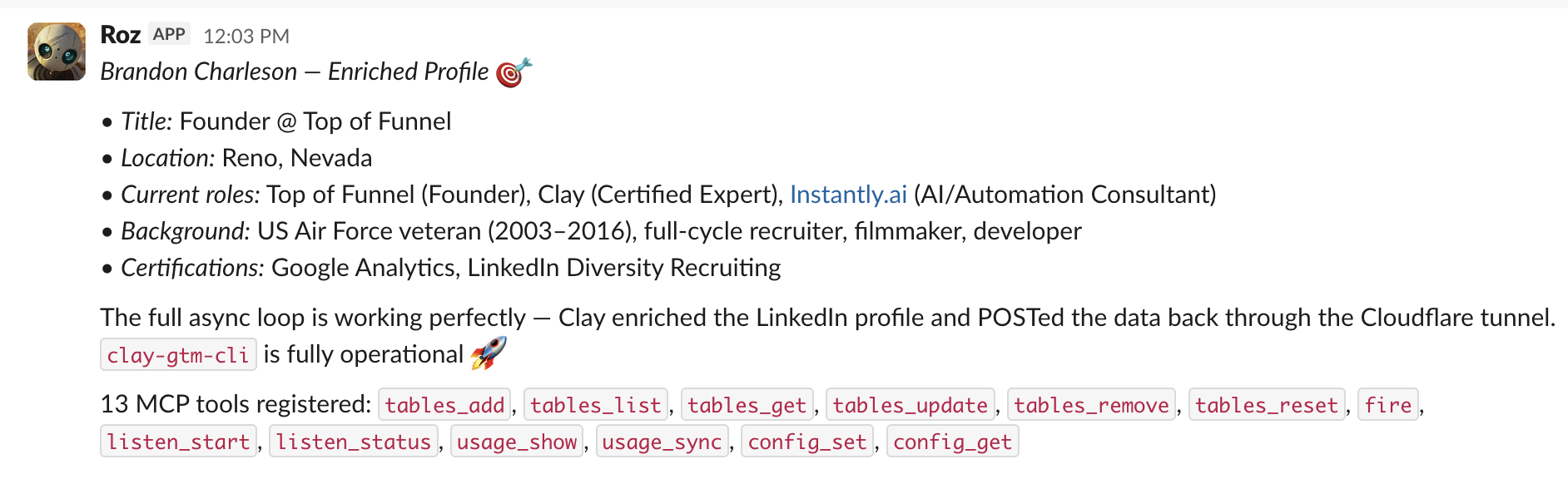
Agent fires clay fire enrich-lead --wait → Clay enriches the LinkedIn profile → POSTs the result back through the cloudflared tunnel → agent receives structured JSON. Fully autonomous.
The Problem with Clay + AI Agents Today
Without clay-gtm-cli
- Agent POSTs to Clay webhook — no way to get results back
- Manual polling of Clay dashboard or Airtable exports
- Callback URLs require cloud infrastructure (Lambda, ngrok)
- Row limit surprises — suddenly nothing processes
- No way to wire Clay into an autonomous agent loop
With clay-gtm-cli
- Fire webhook, block, get JSON back — one command
- cloudflared auto-manages the public callback URL
- Zero cloud infra — runs entirely local
- Row tracking warns you before Clay silently stops
- MCP tools wire Clay directly into Claude / Cursor
Why This Architecture
Clay Becomes a Function Platform
Each Clay table is a callable function. You define the logic once inside Clay — enrichment steps, validation rules, integrations — and the agent calls it by name like any other tool.
You define the logic
Build enrichment workflows in Clay’s visual builder — Apollo, Hunter, ZeroBounce, any integration.
Agent calls it as a tool
clay fire enrich-lead --data ... --wait — same interface regardless of what’s behind it.
Rows are an execution log
Every invocation creates a row in Clay. Full audit trail of what was sent, what was enriched, and what was returned.
API Keys Never Leave Clay
Your agent only sees a webhook URL. The actual API keys for Apollo, Hunter, ZeroBounce, LinkedIn — they live inside Clay’s environment and never touch your agent’s context.
https://app.clay.com/webhook/abc123Webhook URL only — no auth value, no secrets
All credentials stay in Clay’s managed environment. Your agent operates with zero-trust access.
Why Clay Changes the GTM Game
Clay isn’t just another enrichment tool — it’s an integration platform with a built-in credit system that fundamentally changes how fast you can move.
Pre-Built Integrations
One Clay login gives you access to Apollo, Hunter, ZeroBounce, Clearbit, BuiltWith, Dropcontact, LinkedIn, and 140+ more data providers. No individual vendor signups, no managing dozens of API keys.
One Currency for Everything
Instead of juggling billing across Apollo, Hunter, Clearbit, and more — Clay’s credit system lets you pay once and use any provider. Switch enrichment sources in seconds without new contracts.
Sprint-Based GTM
GTM is about fast validation loops. Test an ICP, validate an offer, check PMF — all in days, not weeks. Clay’s instant access to 150+ integrations means you skip the vendor evaluation cycle entirely.
clay-gtm-cli Turns Clay Into Agent Tools
With clay-gtm-cli, every Clay table becomes a callable function your agent can invoke. Build an “enrich lead” table once in Clay, and your agent calls it like any other tool — no API keys, no vendor SDKs, no custom code. The entire 150+ integration catalog is available as agent-callable functions.
Set Up an OpenClaw Agent with Clay
OpenClaw is the AI agent that uses clay-gtm-cli to run enrichment autonomously. Two steps: configure the MCP server, then point your agent at Clay.
Add clay-gtm-cli as an MCP Server
// In your Claude Code settings (~/.claude/settings.json)
// or Cursor settings (~/.cursor/mcp.json)
{
  "mcpServers": {
    "clay": {
      "command": "npx",
      "args": ["clay-gtm-cli", "mcp"]
    }
  }
}
This registers all clay-gtm-cli commands as MCP tools. Your agent can now call tables_add, fire, listen_start, and more directly.
Set Up OpenClaw (Your AI Agent)
OpenClaw is the AI agent that uses these CLI tools to run outbound autonomously. If you haven’t set it up yet, follow our step-by-step setup guide — it covers installation, configuration, and connecting to your tools including clay-gtm-cli.
OpenClaw Setup GuideGive Your Agent a Task
# Example: tell your OpenClaw agent to enrich a lead
"Enrich this LinkedIn profile and find their verified email:
https://linkedin.com/in/jane-doe

Use the enrich-lead Clay table. Wait for the result
and save the output to our CRM."
The agent will call clay fire enrich-lead --wait under the hood, passing the data to Clay and receiving the enriched result back — all without seeing any API keys.
How It Works
clay fire --waitPOST webhookPOST callback{ enriched JSON }Quick Start
1. Install
npm install -g clay-gtm-cli2. Install cloudflared (for callbacks)
# macOS
brew install cloudflared

# Linux
sudo apt install cloudflared
cloudflared creates a free public HTTPS tunnel to your local listener. No account needed — uses Cloudflare’s trycloudflare.com domain.
3. Register a Clay table
clay tables add \
  --name enrich-lead \
  --webhook-url https://app.clay.com/webhook/abc123 \
  --description "Enrich LinkedIn profile + find email"
4. Start the listener
clay listen startPrints a https://random.trycloudflare.com URL. Copy this into the last step of your Clay table (HTTP POST to {{_callback_url}}).
5. Fire and wait
clay fire enrich-lead \
  --data '{"linkedin_url": "https://linkedin.com/in/jdoe"}' \
  --wait
What clay-gtm-cli Gives Your Agent
Webhook Firing
Send any JSON payload to a named Clay table. Fire-and-forget or block until the enriched result returns.
Async Callbacks
cloudflared tunnel spawns in seconds. Clay POSTs enriched data back to your local server. No cloud infra needed.
Tables Registry
Register named webhook tables in ~/.clay/tables.json. Reference them by name, not URL, in every command.
Row Limit Tracking
Clay tables cap at 50K rows. The CLI tracks usage locally, warns at 90%, and hard-stops at 100% with reset instructions.
MCP Server
Every command is exposed as an MCP tool. Claude, Cursor, and any MCP client can call fire, tables_add, listen_start, and more.
Structured JSON Output
All commands return JSON. Pipe to jq, save to files, or feed directly into the next agent step. --pretty, --fields, --quiet supported.
Agent Workflows
Real prompts agents use to trigger Clay enrichment workflows end-to-end.
Enrich a Lead End-to-End
Agent Prompt
“I have a LinkedIn URL. Enrich it via Clay to get their company, title, and work email. Give me the result as structured JSON.”
Agent fires the enrich-lead webhook, blocks until Clay processes the enrichment steps (LinkedIn scrape + email finder + validator), and returns the full structured record.
clay tables listConfirm enrich-lead table is registered
clay usage show enrich-leadCheck row count before firing
clay fire enrich-lead --data '{"linkedin_url":"https://linkedin.com/in/jdoe"}' --waitFire + wait for enriched result
Batch Company Lookup
Agent Prompt
“I have 10 company domains. For each one, run a Clay enrichment to get headcount, industry, and tech stack. Return all results as a JSON array.”
Agent loops through company domains, fires each one to a company-lookup Clay table, collects all callback responses, and returns a normalized array — no dashboard needed.
clay fire company-lookup --data '{"domain":"acme.com"}' --waitEnrich company 1
clay fire company-lookup --data '{"domain":"stripe.com"}' --waitEnrich company 2
clay usage show company-lookupCheck row usage after batch
Find & Validate Email
Agent Prompt
“Given a full name and company domain, find their work email and validate it. Only return deliverable emails.”
Agent fires the find-email Clay table (which runs Apollo/Hunter/Snov enrichment + ZeroBounce validation) and receives the validated result — deliverable only.
clay tables get find-emailConfirm table config and auth key
clay fire find-email --data '{"full_name":"Jane Smith","domain":"acme.com"}' --wait --timeout 60Find + validate email
Log Event to Clay Table
Agent Prompt
“Every time a prospect books a demo, log the event to Clay for enrichment and routing.”
Agent fires a fire-and-forget webhook (no --wait) to a Clay table that handles event enrichment, routing, and CRM push — zero latency from the agent's perspective.
clay fire log-event --data '{"event":"demo_booked","email":"prospect@acme.com","ts":"2026-03-05T14:00:00Z"}'Fire-and-forget (no --wait needed)
Row Limit Management
Agent Prompt
“Check how many rows are left on the enrich-lead table. If I'm above 90%, alert me and prepare the reset command.”
Agent checks usage, computes remaining capacity, and generates the exact reset command pre-filled with the new webhook URL — no manual digging through the Clay dashboard.
clay usage show enrich-leadGet rowsUsed, rowLimit, percentUsed
clay usage showShow all tables at once
clay tables reset enrich-lead --webhook-url https://app.clay.com/webhook/new456Roll over to new table when at limit
Morning Data Pipeline
Agent Prompt
“Every morning, take new signups from the last 24h, enrich each one via Clay, and return a list of enriched records for prioritization.”
Scheduled agent fires each new signup through the enrich-lead table, collects all enriched records, and returns a ranked JSON list — automating your daily enrichment pipeline.
clay listen statusVerify listener + tunnel are running
clay fire enrich-lead --data '{"email":"signup@domain.com"}' --waitEnrich each new signup
clay usage show enrich-leadMonitor daily row consumption
Full Command Reference
Every CLI command has a matching MCP tool. Use either the terminal or let your agent call them directly.
clay tables add -n <name> -w <url> [-k <key>] [-d <desc>] [--row-limit <n>]tables_addRegister a Clay webhook table with name, URL, optional auth key, description, and custom row limit.
clay tables listtables_listList all registered tables with webhook URLs and current row usage.
clay tables get <name>tables_getGet details for one table — URL, usage, description, auth status.
clay tables update <name> [-w <url>] [-k <key>] [-d <desc>] [--row-limit <n>]tables_updateUpdate a table's URL, auth key, description, or row limit.
clay tables remove <name>tables_removeRemove a table from the registry.
clay tables reset <name> [-w <new-url>]tables_resetReset the row counter to zero. Optionally set a new webhook URL (e.g. after duplicating a table in Clay to roll over the 50K limit).
clay fire <table> -d '<json>' [-w] [-t <seconds>] [--dry-run]fireSend a JSON payload to a registered table. Use -w/--wait to block until Clay POSTs the enriched result back via callback. -t sets timeout (default 120s). --dry-run prints the payload without sending.
clay listen start [-p <port>]listen_startStart the callback listener on a local port (default 3456). Cloudflared auto-creates a public HTTPS tunnel URL that Clay uses to POST enriched results back.
clay listen statuslisten_statusCheck if the listener is running — shows PID, port, and the public tunnel URL.
clay usage show [<name>]usage_showShow row usage for all tables or one specific table — rows used, row limit (default 50K), and percent consumed.
clay usage syncusage_syncSync usage data (v2 — currently local-only tracking).
clay config set --callback-url <url>config_setSet a permanent callback URL — skips auto-tunnel when you have your own endpoint.
clay config getconfig_getShow current config, listener status, and table count.
MCP Server Setup
Run clay mcp to start the MCP server. All 13 commands become tools your agent can call directly.
// Cursor (~/.cursor/mcp.json or .cursor/mcp.json)
{
  "mcpServers": {
    "clay": {
      "command": "clay",
      "args": ["mcp"]
    }
  }
}// Claude Desktop (claude_desktop_config.json)
// or Claude Code (~/.claude/settings.json)
{
"mcpServers": {
"clay": {
"command": "npx",
"args": ["clay-gtm-cli", "mcp"]
}
}
}All 13 MCP tools registered:
Your agent sees these as callable tools. It can register tables, fire webhooks, check usage, and manage the listener — all without leaving the conversation.
Setting Up Your Clay Table
One-time human setup per table. After that, agents run autonomously.
Architecture
Every command is a CommandDefinition — one source of truth powering both the CLI subcommand and the MCP tool definition. Adding a new command is one new file.
src/
├── core/
│   ├── types.ts       # CommandDefinition interfaces
│   ├── client.ts      # HTTP client (retry, timeout)
│   ├── config.ts      # ~/.clay/ config management
│   ├── errors.ts      # Typed error classes
│   ├── output.ts      # JSON output (--pretty, --fields, --quiet)
│   ├── usage.ts       # Row count tracking
│   ├── listener.ts    # Local HTTP callback server
│   └── tunnel.ts      # cloudflared tunnel management
├── commands/
│   ├── tables/        # 6 commands
│   ├── fire/          # 1 command (the core one)
│   ├── listen/        # 2 commands
│   ├── usage/         # 2 commands
│   └── config/        # 2 commands
└── mcp/
    └── server.ts      # Auto-registers all CommandDefinitions as MCP tools
Same pattern as instantly-cli
The CommandDefinition architecture is shared across instantly-cli, ms365-cli, and clay-gtm-cli. One schema definition generates the Commander.js subcommand, the Zod schema, and the MCP tool — zero duplication.
cloudflared tunnel design
The tunnel spawns as a child process. stdout is parsed with regex to capture the https://[a-z0-9-]+\.trycloudflare\.com URL. PID, port, and URL are stored in ~/.clay/listener.json.
Ready to give your agent Clay superpowers?
Install clay-gtm-cli, register your first table, and fire your first enrichment webhook in under 2 minutes.
Building a Clay-powered agent workflow? Get started with Clay and we can deploy and manage it end-to-end.